You’re staring at the terminal. You know what to build. But your hands don’t move. The workflow you’ve used for years, the one wired into your hands, feels off. Not broken exactly. Just… wrong-shaped for the work in front of you.
I’ve been sitting with this feeling for months. AI agents writing code faster than I can review it. The gap between “I know what to build” and “it’s built” shrinking to minutes. And the growing realization that the process I’d refined over a decade was designed for a world that’s already moved on.
So I’m trying something different. Starting this week, I’m running a new workflow. Not because I read a manifesto. Because the old one stopped fitting.
The Thing Nobody Tells You
AI didn’t make coding faster. That’s the surface story. What it actually did was relocate where the real work happens.
The old model: you think, you type, the tool catches your typos, you ship. Progress measured in keystrokes. Quality measured in test coverage. The human hand on every line.
That model assumed the bottleneck was typing speed. It wasn’t. It was never about the typing. It was about judgment: what to build, how to structure it, when to stop. The typing was just the artifact.
Now an agent handles the artifact. And if your workflow is still organized around the artifact, you’re optimizing for the wrong thing.
Linear Is a Lie
Plan. Build. Test. Ship. Four boxes. Clean arrows. Every project management tool draws it this way. Every sprint retrospective assumes it.
It was always a simplification.
Real work is messy. You discover mid-build that the plan was based on a wrong assumption. Testing reveals requirements you never discussed. Shipping surfaces problems nobody predicted. The “linear” process was actually a series of corrections disguised as forward motion.
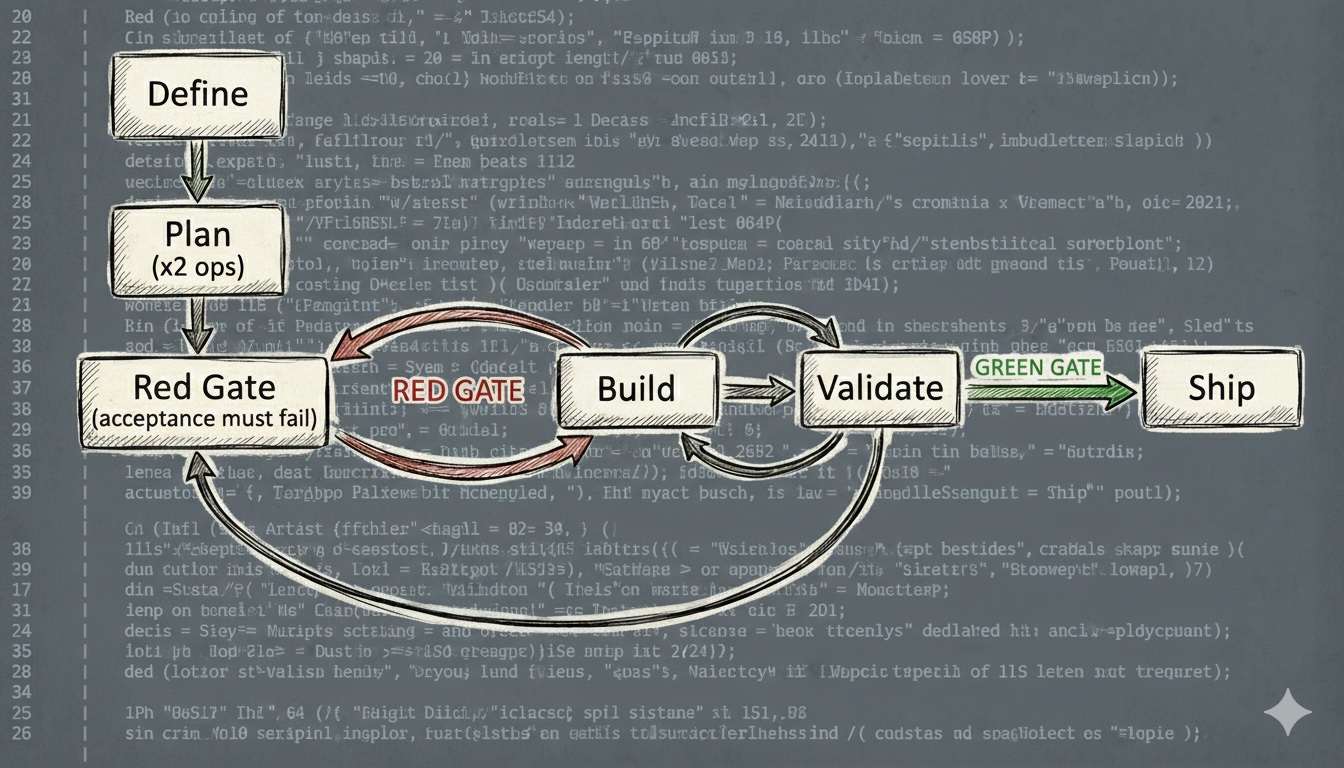
The new workflow drops the pretense. There are no phases. There are modes. Plan mode. Build mode. Validate mode. You switch between them based on what the work needs. Sometimes you’re in plan mode for an hour. Sometimes for 30 seconds between two build cycles.
Two rules are non-negotiable: the acceptance test must be red before Build starts, and never ship without a green gate. Everything else bends.
The Loop
I understood this before I understood software. I just didn’t have the words for it.
When I was a kid, maybe eight or nine, my mom used to send me to buy groceries. This was the ’80s in Italy, when kids still walked across town alone and nobody called the police. She’d hand me a long list, I’d walk to the big shop on the other side of the neighborhood, and I’d come back forty minutes later with half the items wrong and a few missing entirely. Too many things to remember. Too long between leaving and coming back. No chance to course-correct.
So we changed the system. Shorter list. Closer shop. More trips. Each trip was small enough that I could get it right, and if I got something wrong, the fix was a five-minute walk, not a forty-minute expedition.
It didn’t take longer overall. It just failed smaller.
That’s the whole idea behind this workflow, distilled into a grocery run. Small loops. Fast feedback. Fail small, correct fast, keep moving.
   ┌────────────┐
   │   Define   │
   └─────┬──────┘
         │
   ┌─────▼──────┐   ┌──────┐   ┌──────────┐
   │    Plan    │   │ Build │◄─▶│ Validate │─┐
   │  (x2 ops)  │   └──▲───┘   └────┬─────┘ │
   └─────┬──────┘      │             │       │
         │          RED GATE      GREEN GATE │
   ┌─────▼──────┐      │             │       │
   │  Red Gate  │──────┘        ┌────▼────┐  │
   │ (acceptance│               │  Ship   │  │
   │  must fail)│               └─────────┘  │
   └────────────┘                            │
         ▲                                   │
         └───────────────────────────────────┘
Define once. Ship once. Everything between is a loop: clarify what you want, produce changes, verify they’re real. Adjust. Repeat. The size of each cycle depends on how much you trust what you’re building. High confidence, big loops. High uncertainty, tiny ones.
The Brief
Every piece of work starts with two files, not one.
specs.md is the what and why. The objective. The context. The acceptance criteria. The constraints. What “done” means in one sentence. What’s in scope. What’s out. A running log of decisions and course corrections. It’s not a prompt (those are disposable) and not a traditional spec (those are rigid). It’s a living brief. You write what you know, leave gaps for what you don’t, and update it as the work teaches you things.
plan.md is the how. But Plan has two jobs, not one.
First: the implementation strategy. The agent reads the specs, proposes an approach, breaks it into small chunks. Each chunk is a concrete step it can execute and validate independently. The plan evolves: if a chunk reveals that the next step should be different, you update the plan, not force the original.
Second: the acceptance test specification. Before a single line of implementation is written, the agent writes an automated test that exercises the system from the outside, against the acceptance criteria in specs.md. Not a unit test. The full journey: input goes in, expected outcome comes out. This test will fail. It’s supposed to fail. That failure is the proof the target is real.
The separation matters. Specs are yours. They capture intent and context that outlive any single implementation attempt. The plan is the agent’s proposal for how to get there. If the plan goes sideways, you scrap it and write a new one. The specs stay.
Both files live in Mindforge , my Obsidian vault. Not in a chat window. Not copy-pasted into a prompt. In a vault the agent has direct filesystem access to. I think of Mindforge as the Context Engine: one place where human thinking and agent execution meet. The agent reads it before every session. It writes to it during the work. No context is lost between sessions, between tasks, or between tools.
The log inside specs.md is the long-term memory of the project. “We tried X. X failed because of Y. Switched to Z.” Without it, the reasoning behind every decision evaporates the moment you close the editor. You end up with code that works and nobody remembers why it’s shaped that way. Prompts are disposable. The log is not.
I’ve been burned by missing context enough times. The log stays.
The Red Gate
The acceptance test is written. Now you run it.
If it fails: good. That’s the entry condition for Build. You have a target. The agent knows what “done” means without asking you.
If it passes: stop. Something is wrong. Either the test doesn’t actually test the right thing, the feature already exists, or you misunderstood the requirements. All three need to be resolved before you write a single line of implementation.
This gate is not optional. The agent cannot proceed to Build without a confirmed red test. No exceptions, no shortcuts.
I’ve shipped things that “felt done” without this kind of anchor. You think the work is complete. The edge case surfaces at 11 PM. You trace it back to a requirement nobody wrote down, a test nobody ran, an assumption nobody questioned. The red gate is how you prevent that.
Red is not failure. Red is proof you defined the target correctly.
The Setup
The protocol is tool-agnostic. What it requires is an agent capable of autonomous file operations: reading specs, writing code, running commands, self-validating, and surfacing to you only when stuck. Any agent with filesystem access and a terminal fits. The workflow doesn’t care which one you use.
That said: I’m using Claude Code, Anthropic’s CLI agent. Not because it’s the only option, but because it fits this workflow better than the alternatives I’ve tried. It’s fast. It handles autonomous loops well: read the specs, build, self-check, fix, repeat. It stays in the terminal where I work, reads and writes files directly, and doesn’t need me to babysit a chat window. When the workflow requires an agent that can run ahead on its own and come back with results, speed and autonomy matter more than anything else. If you’re using a different agent, the loop is the same. The tools are yours to choose.
I’m setting up a dedicated agent profile for this: a profiled agent I’m calling “the coder.” A CLAUDE.md file gives it persistent context about the workflow, the rules of engagement, and the project structure. It knows how I work before I type a single word. On top of that, a dedicated skill (slash command) for each mode in the loop: /start to bootstrap a new task, /plan to enter planning mode, /build to hand off implementation, /validate to run the checklist, /ship to close it out. Each skill encodes the rules for that mode so the agent behaves consistently without me repeating instructions every session.
Letting Go of the Keyboard
This is the hard part. The part that doesn’t feel right, even when it works.
The agent reads the specs. Proposes an approach. You discuss, poke holes, adjust. Then the agent takes over. It builds. It runs the checks after every chunk: compilation, unit tests, linting. If something breaks, it fixes it and re-checks. Up to three attempts before it surfaces the problem to you. When all chunks are done, it runs the acceptance test. If the Green Gate is up, it escalates to Ship. If not, it loops back to Plan.
You don’t watch every line. You don’t interrupt mid-flow.
When it comes back, it presents what it built: what passed, what failed, what it fixed along the way. Then you review. Not the code line by line (the linter and tests handle that). You review what agents consistently miss: architectural fit, security blind spots, performance traps, edge cases it didn’t consider, premature abstractions.
If something is wrong, you describe the problem. The agent re-enters its loop. Usually one or two rounds.
It gets easier with practice.
What You Become
You stop being the person who writes the code. You become the person who decides what code should exist.
System designer. Risk evaluator. The one who says “this doesn’t belong here” or “what happens when this fails at 3 AM with no data?”
It’s a different kind of tired. Less physical. More cognitive. You’re trading keystroke fatigue for decision fatigue. Some days that’s a better trade. Some days it isn’t.
But the output is different too. When it works, the agent produces clean, tested, consistent code at a pace I can’t match. And my job becomes making sure that pace doesn’t outrun my understanding.
Trust, but Verify Everything
AI-generated code runs. It passes tests. It looks correct. The temptation is to trust it because it’s fast and confident. But that confidence comes from training data, not from understanding your system.
“It ran” is not “it’s correct.” I’ve learned this the hard way.
Validation isn’t a step at the end. It’s a mode you stay in. Automated checks run after every chunk: compilation, tests, linting, type checking. Human review catches the rest. Does this solution belong here long-term? Did it introduce a subtle security hole? Is it solving a problem we actually have?
But the primary signal is the Green Gate: the acceptance test you wrote before Build starts, now passing. That’s the only check that confirms the system does what it was supposed to do, from the outside, against the real requirements. Everything else is supporting evidence.
No green gate, no ship. Not negotiable.
If you can’t answer those questions, you don’t ship. Period.
Shipping Clean
When the loop ends, shipping is a deliberate act. Not “the agent stopped producing code,” but “I’ve decided this work is fit to exist.”
Clean git history. PR description that explains what, why, and how. Ticket updated. Time logged. And a short retrospective: what the agent did well, where it struggled, what I’d change next time.
Close the context. Start fresh.
When the Loop Breaks
Some days you skip planning entirely. Trivial fix. Just build and validate.
Some days you stay in plan mode for hours because the problem is deep and one wrong move cascades.
Some days the agent goes in circles. Three attempts, four, five. It’s stuck. You kill the context. Re-read specs with fresh eyes. Start a new loop from scratch. No sunk cost. No sentimentality.
Some days you fire up a second agent to review the first one’s work. Fresh eyes, no sunk cost bias. It’s the cheapest code review you’ll ever get.
Process is a tool. The moment it becomes a religion, it stops working.
What I’m Betting On
- Fewer large mistakes matter more than more small wins
- Recoverability matters more than perfection
- Human attention should go where it has the highest leverage
- Learning how to work with AI is more valuable than learning to work faster without it
What Could Go Wrong
Plenty.
This isn’t a framework for beginners. If you don’t have the engineering fundamentals to evaluate what the agent produces, you’ll ship bad code with high confidence. The agent won’t flag it. It doesn’t know what it doesn’t know.
This isn’t a guarantee of better outcomes. It’s a bet that a workflow designed around AI’s actual strengths (fast execution, tireless iteration) and weaknesses (no real judgment, no context beyond what you give it) will outperform the old way.
And it’s an experiment. I’m tracking where agents fail, where I still bottleneck, where the loop breaks down. If something doesn’t work, I change it. The workflow is subject to the same rule it enforces: iterate or discard.
Starting Now
This week. Every task. New protocol.
I’ll report back on what breaks.
You open the terminal, write the first specs.md, and start the loop. This one is untested. But the old one wasn’t working either, so here we are.